Search this keyword

Showing posts with label iPhone. Show all posts

Suggested apps for BHL's Life and Literature Code Challenge


Since I won't be able to be at the Biodiversity Heritage Library's Life and Literature meeting I thought I'd share some ideas for their Life and Literature Code Challenge. The deadline is pretty close (October 17) so having ideas now isn't terribly helpful I admit. That aside, here are some thoughts inspired by the challenge. In part this post has been inspired by the Results of the PLoS and Mendeley "Call for Apps", where PLoS and Mendeley asked for people (not necessarily developers) to suggest the kind of apps they'd like to see. As an aside, one thing conspicuous by it's absence is a prize for winning the challenge. PLoS and Mendeley have a "API Binary Battle" with a prize of $US 10,001, which seems more likely to inspire people to take part.

Visual search engine
I suspect that many BHL users are looking for illustrations (exemplified by the images being gathered in BHL's Flickr group). One way to search for images would be to search within the OCR text for figure and plate captions, such as "Fig. 1". Indexing these captions by taxonomic name would provide a simple image search tool. For modern publications most figures are on the same page as the caption, but for older publications with illustrations as plates, the caption and corresponding image may be separated (e.g., on facing pages), so the search results might need to show pages around the page containing the caption. As an aside, it's a pity the Flickr images only link to the BHL item and not the BHL page. If they did the later, and the images were tagged with what they depict, you could great a visual search engine using the Flickr API (of course, this might be just the way to implement the visual search engine — harvest images, tags with PageID and taxon names, upload to Flickr).

Mobile interface
The BHL web site doesn't look great on an iPhone. It makes no concessions to the mobile device, and there are some weird things such as the way the list of pages is rendered. A number of mainstream science publishers are exploring mobile versions of their web sites, for example Taylor and Francis have a jQuery Mobile powered interface for mobile users. I've explored iPad interfaces to scientific articles in previous posts. BHL content posses some challenges, but is fundamentally the same as viewing PDFs — you have fixed pages that you may want to zoom.

OCR correction
There is a lot of scope for cleaning up the OCR text in BHL. Part of the trick would be to have a simple use interface for people to contribute to this task. In an earlier post I discussed a Firefox hOCR add-on that provides a nice way to do this. Take this as a starting point, add a way to save the cleaned up text, and you'd be well on the way to making a useful tool.

Taxon name timeline
Despite the shiny new interface, the Encyclopedia of Life still displays BHL literature in the same clunky way I described in an earlier blog post. It would great to have a timeline of the usage of a name, especially if you could compare the usage of different names (such as synonyms). In many ways this is the BHL equivalent Google Books Ngram viewer.

These are just a few hastily put together thoughts. If you have any other ideas or suggestions, feel free to add them as comments below.

- Posted using BlogPress from my iPad
Viewing scientific articles on the iPad: cloning the Nature.com iPhone app using jQuery Mobile

Over the last few months I've been exploring different ways to view scientific articles on the iPad, summarised here. I've also made a few prototypes, either from scratch (such as my response to the PLoS iPad app) or using Sencha Touch (see Touching citations on the iPad).

Today, it's time for something a little different. The Sencha Touch framework I used earlier is huge and wasn't easy to get my head around. I was resigning myself to trying to get to grips with it when jQuery Mobile came along. Still in alpha, jQuery Mobile is very simple and elegant, and writing an app is basically a case of writing HTML (with a little Javascript here and there if needed). It has a few rough edges, but it's possible to create something usable very quickly. And, it's actually fun.

So, to learn a it more about how to use it, I decided to see if I could write a "clone" of Nature.com's iPhone app (which I reviewed earlier). Nature's app is in many ways the most interesting iOS app for articles because it doesn't treat the article as a monolithic PDF, but rather it uses the ePub format. As a result, you can view figures, tables, and references separately.

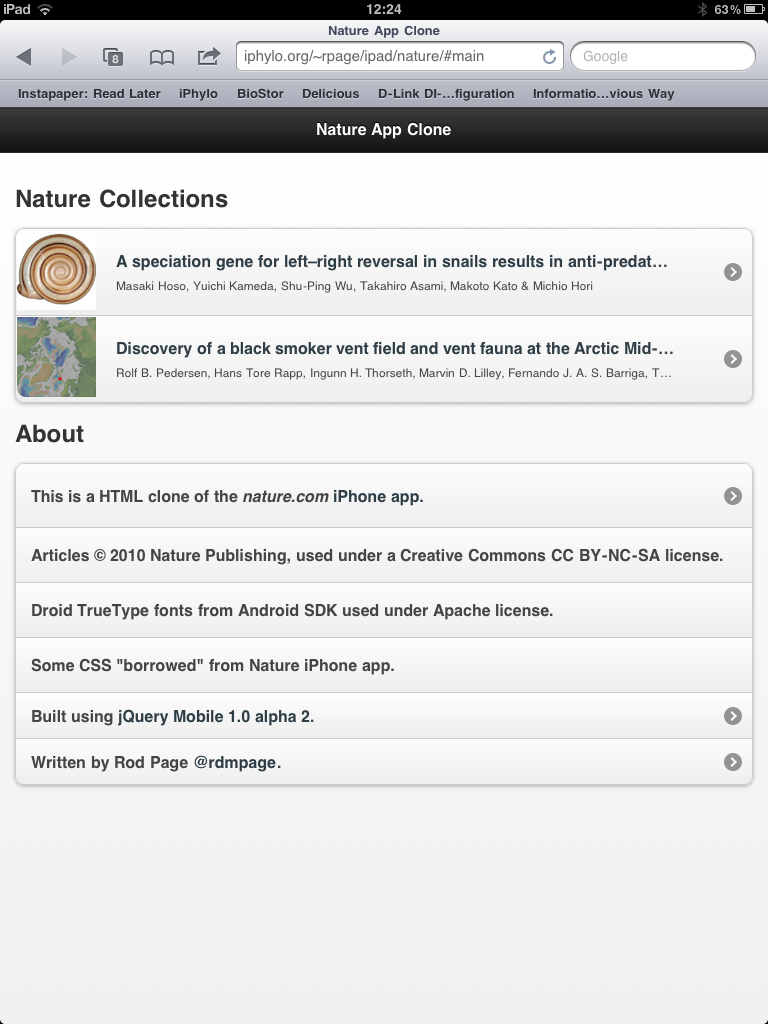
The cloneYou can see the clone here.

photo.PNGphoto.PNG


I've tried to mimic the basic functionality of the Nature.com app in terms of transitions between pages, display of figures, references, etc. In making this clone I've focussed on just the article display.

A web app is going to lack the speed and functionality of a native app, but is probably a lot faster to develop. It also works on a wider range of platforms. jQuery Mobile is committed to supporting a wide range of platforms, so this clone should work on platforms other than the iPad.

The Nature.com app has a lot of additional functionality apart from just displaying articles, such as list the latest articles from Nature.com journals, manage a user's bookmarks, and enable the user to buy subscriptions. Some of this functionality would be pretty easy to add to this clone, for example by consuming RSS feeds to get article lists. With a little effort one could have a simple, Web-based app to browse Nature content across a range of mobile devices.

Technical stuff

Nature's app uses the ePub format, but Nature's web site doesn't provide an option to download articles in ePub format. However, if you use a HTTP debugging proxy (such as Charles Proxy) when using Nature's app you can see the URLs needed to fetch the ePub file.

I grabbed a couple of ePub files for articles in Nature communications and unzipped them (.epub files are zip files). The iPad app is a single HTML file that uses some Ajax calls to populate the different views. One Ajax call takes the index.html that has the article text and replaces the internal and external links with calls to Javascript functions. An article's references, figure captions, and tables are stored in separate XML files, so I have some simple PHP scripts that read the XML and extract the relevant bits. Internal links (such as to figures and references) are handled by jQuery Mobile. External links are displayed within an iFrame.

There are some intellectual property issues to address. Nature isn't an Open Access journal, but some articles in Nature Communications are (under the Commons Attribution-NonCommercial-Share Alike 3.0 Unported License), so I've used two of these as examples. When it displays an article, Nature's app uses Droid fonts for the article heading. These fonts are supplied as an SVG file contained within the ePub file. Droid fonts are available under an Apache License as TrueType fonts as part of the Android SDK. I couldn't find SVG versions of the fonts in the Android SDK, so I use the TrueType fonts (see Jeffrey Zeldman's Web type news: iPhone and iPad now support TrueType font embedding. This is huge.). Oh, and I "borrowed" some of the CSS from the style.css file that comes with each ePub file.

Navigating the Encyclopedia of Life tree on the desktop and the iPhone

This week seems to be API week. The Encyclopedia of Life API Beta Test has been out since August 12th. By comparison with the Mendeley API that I've spent rather too much time trying to get to grips with, the EOL API release seems rather understated.

However, I've spent the last couple of days playing with it in order to build a simple tree navigating widget, which you can view at http://iphylo.org/~rpage/eoltree/.

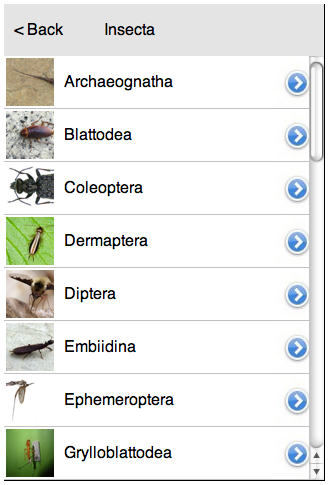
The widget resembles Aaron Thompson's Taxonomy (formerly called KPCOFGS) iPhone app in that it uses the iPhone table view to list all the taxa at a given level in a taxonomic tree. Clicking on a row in this table takes you to the descendants of the corresponding taxon, clicking "Back" takes you back up the tree. if you've reached a leave node (typically a species) the widget displays a snippet of information about that taxon. It also resembles Javier de la Torre's taxonomic browser written in Flex.

Here's a screen shot of the widget running in a desktop web browser:

insecta.png

Here's the same widget in the iPhone web browser:

web.pngUsing the API
The EOL API is pretty straightforward. I call the http://www.eol.org/api/docs/hierarchy_entries API to get the tree rooted at a given node, then populate each child of that node using http://www.eol.org/api/docs/pages. The result is a simple JSON file that I cache locally to speed up performance and avoid hitting the EOL servers for the same information. because I'm locally caching the API calls I need a couple of PHP scripts to do this, but everything else is HTML and Javascript.

iPhone and iPad
I've not really developed this for the iPhone. I've cobbled together some crude Javascript to simulate some iPhone-like effects, but if I was serious about the phone I'd look into one of the Javascript kits available for iPhone development. However, I did want something that was similar in size to the iPhone screen. The reason is I'm looking at adding taxonomic browsing to the geographic browser I described in the post Browsing a digital library using a map, so I wanted something easy to use but which didn't take up too much space. In the same way that the Pygmybrowse tree viewer I played with in 2006 was a solution to viewing a tree on a small screen, I think developing for the iPhone forces you to strip things down to the bare essentials.

I'm also keeping the iPad in mind. In portrait mode some apps display lists in a popover like this:

popover_flatten.png

This popover takes up a similar amount of screen space to the entire iPhone screen, so if I was to have a web app (or native app) that had taxonomic navigation, I'd want it to be about the size of the iPhone.

Let me know what you think. Meantime I need to think about bolting this onto the map browser, and providing a combined taxonomic and geographic perspective on a set of documents,

Viewing scientific articles on the iPad: towards a universal article reader

There are a growing number of applications for viewing scientific articles coming out for the iPhone and iPad. I'm toying with extending the experiments described in an earlier post when I took the PLoS iPad app to task for being essentially a PDF page-turner, so I thought I should take a more detailed look at the currently available apps. In particular, I'm interested in how the apps solve some basic tasks, and whether there is a consistent "vocabulary" for interacting with an article. Put less pretentiously, do the apps display things such as lists of articles, citations, references, figures, and bibliographic data in similar ways, or does the user have to learn new rules for each app? I'm also interested in how the apps treat the article (e.g., as a monolithic PDF, as a document with pages, or as a web document where pagination has no meaning), and how they get their content (from a publisher, from the user's social network, from the user's personal library).

Nature
In this post I'm going to look at Nature.com's app. Future posts will explore other apps. I'm interested in what people have done so far, and how we could improve the reading experience. Long term I'm interested in whether there's scope for a "universal article reader" that can take diverse formats (including XML, PDF, and page images) and display them in a consistent and useful way. In the diagrams below I'm using touch gesture symbols from Graffletopia (see Touch Gesture Reference Guide).


Contents
Nature's app is limited to articles published by Nature, and displays the available articles as a list with thumbnails of a figure from the article. The app fetches this list using Nature's mobile API. Up until April 30th the fulltext of an article was free, at at present you are limited to getting abstracts. It's interesting that the list of articles isn't retrieved using a RSS feed, I presume because Nature wanted to use some simple authentication to avoid users downloading all their closed-access content for free.

touch1.jpg

Article display
Nature's app, unlike all the others I've seen so far, doesn't use PDFs. Instead it uses ePub. Unlike many ePub book readers (including Apple's own iBooks), the Nature app doesn't render the article as a series of pages, but as one continuous document that you scroll down by dragging (it's essentially a web page). You can't zoom the text, but the text size is fine for reading.

touch2.jpg

Citations
Citations in the body of the article are links. If you tap them the full citation slides in from the right, with a link to the publisher's website. If you tap the link the app opens the website within the app. This can be a little jarring as you move from a customised view of an article to a web page designed for a desktop. In the case of a Nature article, it would be more elegant if the app recognised that the cited reference was a Nature article and rendered it natively in the app. More generally the transition between app and website might be less jarring if journal publishers developed mobile versions of their websites.

touch3.jpg


Figures
The figures aren't displayed directly in the body of the article, but each mention of a figure in the body of the text is a link. Tapping the link causes the figure to slide up from the bottom of the screen. A button in the top right hand corner enables you to toggle between displaying the figure and it's caption (shown as white text on a black background). You can use pinch and spread to zoom in and out of the figure, as well as save it to the photo library on your device.

touch4.jpg


Summary
I've started with the Nature app as I think it's the only one so far to seriously tackle the challenge of displaying an article on a mobile device. Instead of displaying PDFs it repackages the articles in ePub format and the result is much more interactive than a PDF.

I hope to explore other article viewing apps in later posts, but it's worth noting that we should also be looking at other apps for ideas. Personally I really like the Guardian's iPhone app, which I use as my main news reader. It has a nice gallery feature to display thumbnails of images (imagine a gallery of an article's figures), and uses tags effectively.