Search this keyword

Showing posts with label XML. Show all posts

Towards an interactive taxonomic article: displaying an article from ZooKeys

One of the things I keep revisiting is the way we display scientific articles. Apart from Nature's excellent iPhone and iPad apps, most efforts to re-imagine how we display articles are little more than glorified PDF viewers (e.g., the PLoS iPad app).

Part of the challenge is that if we make the article more interactive we immediately confront the problem of how to link to other content. For example, we may have a lovingly crafted ePub view (e.g., Nature's apps), but what happens when the user clicks on a citation to another paper? If the paper is published by the same journal, then potentially it could be viewed using the same viewer, but if not then we are at the mercy of the other publisher. They will have their own ideas of how to display articles, so the simplest fallback is to display the cited article in a web browser view. The problem with this is that it breaks the user experience - the other publisher is unlikely to follow the same conventions for displaying an article and its links. If we are lucky the cited article might be published in an Open Access journal that provides, say, XML based on the NLM DTD standard. Knowing whether an article is Open Access or not is not straightforward, and different journals have their own unique interpretation of the NLM standard.

Then there is the issue of other kinds of content, such as taxonomic names, specimens, DNA sequences, geographic localities, etc. We lack decent services for many of these objects, as a result efforts like PLoS Biodiversity Hub end up being underwhelming collections of reformatted journal articles, rather then innovative integrations of biodiversity knowledge.

With these issues in mind I've started playing with ZooKeys XML, initially looking at ways to display the article beyond the conventional format. Ultimately I'd like to embed the article in a broader web of citations and data. ZooKeys articles are available in PDF, HTML, and XML. The HTML has links to taxon pages, maps, etc., which is nice, but I personally find this a little jarring because it interrupts the reading experience. The ZooKeys web site also surrounds the article with all paraphernalia of a publisher's web site:

Zookeys
As a first experiment, I've taken the XML for article At the lower size limit for tetrapods, two new species of the miniaturized frog genus Paedophryne (Anura, Microhylidae) http://dx.doi.org/10.3897/zookeys.154.1963 and used a XSLT style sheet to reformat the article. I've borrowed some ideas from Nature's apps, such as the font for the title, displaying the abstract in bold, and showing all the figures in the article as thumbnails near the top. I've also added some basic interactivity, which you can see in the video below. Instead of figures being in one place in the article, wherever a figure is mentioned in the article (e.g., "Fig. 1") if you click on the reference to the figure it appears. If the article display a point locality using latitude and longitude, instead of launching a separate browser window with a Google map, click on the locality and the map appears. The idea is that the flow of reading isn't interrupted, figures, maps, and citations all appear in the text.


This demo (which you can see live at http://iphylo.org/~rpage/zookeys) is limited, but most of its functionality comes from simply reformatting XML using XSLT. There's a little bit of jQuery for animation, and I ended up having to write a PHP script to convert verbatim latitude and longitude coordinates to the decimal coordinates expected by Google Maps, but it's all very light weight. It wouldn't take much to add some JSON queries to make the taxon names clickable (e.g., showing a summary of a taxon from EOL). Because ZooKeys uses the NLM DTD for its XML, some of this code could also be applied to other journals, such as PLoS, so we could start to grow a library of linked, interactive taxonomic articles.

ZooBank on CouchDB: UUIDs, replication, and embedding the literature in taxonomic databases

ZooBankBannerLast December I released a web site called Australian Faunal Directory on CouchDB, which was part of my ongoing exploration of how to build a simple yet useful database of taxonomic names. In particular, I want to link names directly to the primary taxonomic literature. No longer is it adequate to simply list names, or list names with mangled bibliographic details (I'm looking at you, Catalogue of Life). This is the 21st century, so I expect one click from name to literature, or at the most two (via, say, a DOI). Nothing else will cut it.

CouchbaseThe Australian Faunal Directory (AFD) was an eye opener as it was the first serious use I'd made of CouchDB (now CouchBase). I'd played with replicating and forking data in 2010: Catalogue of Life and CouchDB, but the AFD project was bigger, and also inspired me to use web hooks to make the database editable. Suddenly this stuff started to look easy: no schema, simple web services, and tiny amounts of code.

ZooBank
So then my attention turned to ZooBank, which is "the official registry of Zoological Nomenclature, according to the International Commission on Zoological Nomenclature (ICZN)." ZooBank was proposed by Polaszek et al. (2005) in a short piece in Nature ("A universal register for animal names", doi:10.1038/437477a). By providing a registry of names for animals, ultimately it aims to help avoid embarrassing situations such as the example I recount in my paper on BioStor (doi:10.1186/1471-2105-12-187): a recent paper in Nature published the name Leviathan for an extinct sperm whale with a giant bite (doi:10.1038/nature09067), only for authors to have to publish an erratum with a new name (doi:10.1038/nature09381) when it was discovered that Leviathan had already been used for an extinct mammoth.

ZooBank is developed and run by Rich Pyle, and has some nice features, such as RDF export (via LSIDs), but like most taxonomic databases it doesn't link directly to the literature. Where are the DOIs? Where are links to BHL? Where is the ability to add these links? And why is it almost entirely about fish? (OK, I know the answer to that one).

CouchDB
But the thing which really got me thinking about using CouchDB to create a version of ZooBank was Rich Pyle's vision of having a distributed ZooBank, and his insistence on using ugly UUIDs in ZooBank identifiers (e.g., urn:lsid:zoobank.org:act:6BBEF50E-76B4-42EF-97B1-7029DBCD8257). As much as they are ugly, Rich has always argued that they make distributed systems easy because you don't need a centralised system to assign unique identifiers.

Anybody who has played with CouchDB will know that CouchDB uses UUIDs by default to create identifiers for database documents. It also excels at data synchronisation, and can run on platforms large and small (including mobile such as Android and iOS). This means a database could be updated on an iPhone or iPad without an Internet connection, then the data could be synchronised with other databases. Indeed, I developed this CouchDB clone of ZooBank on my MacBook, then pointed it at CouchDB running on my server and within minutes had an exact copy of the database running on the server. This ease of replication, together with the joy of schema-less design makes CouchDB seem an obvious fit to ZooBank.

Demo
You can see the ZooBank on CouchDB demo here. It's not a complete copy of ZooBank, but has most of it. I reuse the UUIDs issued by ZooBank, so that

http://zoobank.org:80/?uuid=6bbef50e-76b4-42ef-97b1-7029dbcd8257

becomes

http://iphylo.org/~rpage/zoobank/6bbef50e-76b4-42ef-97b1-7029dbcd8257

As usual it's all a bit crude, but has some nice features, such as links to BHL content with a built in article viewer I wrote for the AFD project:

EtheostomaWhat's next?
At present only a fraction of the ZooBank references have external links, I hope to add more in the next few days, using both automatic scripts and the web hook interface. The search interface needs work, and being that ZooBank is about nomenclature and not taxonomy, it might be useful to add a classification (say from the Catalogue of Life) so that users can navigate around the names (and get a sense of how many are *cough* fish).

At present to display a reference I do one of four things:
  1. If reference is in BHL I use my article viewer
  2. If there is a freely available PDF online I display that using Google Docs PDF viewer
  3. If 1 and 2 don't apply, but there is a DOI then I resolve the DOI and display the result in an IFRAME (yuck)
  4. If none of 1-3 apply I display a blank rectangle

There are a couple ways we could improve this. The first is to enhance the display of BHL content by making use of the structure of the source DjVu files. Another is to make use of the XML now being made available by the journal Zookeys (see my blog post, and Pensoft's announcement that ZooKeys is now being archived by PubMed Central, complete with taxonomic markup). There are a lot of ZooKeys articles in ZooBank, so there's a lot of potential for embedding an article viewer that takes Zookeys XML and redisplays it with taxonomic names and references as clickable links that link to other ZooBank content. That way we approach the point where taxonomic literature becomes a first class citizen of a taxonomic database.

Viewing scientific articles on the iPad: the PLoS Reader

Continuing on from my previous post Viewing scientific articles on the iPad: towards a universal article reader, here are some brief notes on the PLoS iPad app that I've previously been critical of.

There are two key things to note about this app. The first is that it uses the page turning metaphor. The article is displayed as a PDF, a page at a time, and the user swipes the page to turn it over. Hence, the app is simulating paper on the iPad screen.

turn.jpg


But perhaps more interesting is that, unlike the Nature app discussed earlier, the PLoS app doesn't use a custom API to retrieve articles. Instead the app uses RSS feeds from the PLoS site. PLoS provides journal-specific RSS feeds, as well as subject-specific feeds within journals (see, for example, the PLoS ONE home page). The PLoS Reader app takes these feeds and uses them to create a list of articles the reader can choose from.

A nice feature of the PLoS ATOM feeds is the provision of links to alternative formats for the article (unlike many journal RSS feeds, which provide just a DOI or a URL). For example, the feed item for the article "Transmission of Single HIV-1 Genomes and Dynamics of Early Immune Escape Revealed by Ultra-Deep Sequencing" doi:10.1371/journal.pone.0012303 contains links to the PDF and XML versions of the article:


<link rel="related"
type="application/pdf"
href="http://www.plosone.org/article/fetchObjectAttachment.action?uri=info:doi/10.1371/journal.pone.0012303&representation=PDF"
title="(PDF) Transmission of Single HIV-1 Genomes and Dynamics of Early Immune Escape Revealed by Ultra-Deep Sequencing" />
<link rel="related"
type="text/xml"
href="http://www.plosone.org/article/fetchObjectAttachment.action?uri=info:doi/10.1371/journal.pone.0012303&representation=XML"
title="(XML) Transmission of Single HIV-1 Genomes and Dynamics of Early Immune Escape Revealed by Ultra-Deep Sequencing" />


This makes the task of an article reader much easier. Rather than attempt to screen scrape the article web page, or rely on a rule for constructing the link to the desired file, the feed provides an explicit URL to the different available formats.

I've not seen this feature in other journal RSS feeds, although article web pages sometimes provide this information. BMC journals, for example, provide <link rel="alternate"> tags in the web page for each article, from which we can extract links to the XML and PDF versions, and some journals (BMC included) provide the Google Scholar metadata data tag <meta name="citation_pdf_url"> to link to the PDF. Hence, a generic article reader will need to be able to extract metadata tags from article web pages as it seeks formats suitable to display.

ZooKeys publishes articles of the future

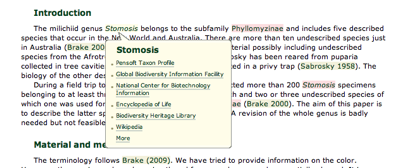
The open access taxonomic journal ZooKeys has published a special issue with four papers, each available in HTML, PDF, and XML, the later being extensively marked up. Penev et al. ("Semantic tagging of and semantic enhancements to systematics papers: ZooKeys working examples", doi:10.3897/zookeys.50.538) describes the process involved in creating these XML files. Two papers (doi:10.3897/zookeys.50.506 and doi:10.3897/zookeys.50.505) were created using authoring tools available in Scratchpads, as outlined by Blagoderov et al. ("Streamlining taxonomic publication: a working example with Scratchpads and ZooKeys", doi:10.3897/zookeys.50.539). When you view the HTMl for these articles you can toggle on or off the highlighting citations, taxonomic names, and geographic co-ordinates. Mousing over a taxonomic name, for example, a popup appears with links to GBIF, NCBI, EOL, BHL, Wikipedia, etc.):

brake.png

I think these papers represent one view of the future of scientific publishing ("article 2.0"), and I'm flattered that Penev et al. cite my Elsevier challenge work (doi:10.1016/j.websem.2010.03.004, preprint at hdl:10101/npre.2009.3173.1) as one of the sources of inspiration (along with the landmark Shotton et al. "Adventures in Semantic Publishing: Exemplar Semantic Enhancements of a Research Article" doi:10.1371/journal.pcbi.1000361, which I've discussed previously). It is also good to see the TaxPub XML schema used by a publisher, and Scratchpads being a part of the process of publishing taxonomic information.

Deep linking

My initial impression is that there is huge of potential here, although I think there is still lots to do. I'm not totally convinced that popups are they way to go (although I've dabbled with them as well), and we need to move beyond simply linking to other sites to a deeper form of integration. For example, a Zookeys article might link to BHL via a taxonomic name, but how about deeper linking? For example, the paper by Brake and von Tschirnhaus (doi:10.3897/zookeys.50.505) contains the following citations:

Biró L (1899) Commensalismus bei Fliegen. Természetrajzi füzetek 22: 198–204.

Kertész K (1899) Verzeichnis einiger, von L. Biró in Neu-Guinea und am Malayischen Archipel gesammelten Dipteren. Természetrajzi füzetek 22: 173–19

Neither reference has any links in the HTML, so the user is under the impression that they aren't available online, but both references have been scanned by BHL. You can see full text for these articles in BioStor (references 52005 and 52004, respectively -- note that the pagination for Biró 1899 is given incorrectly in the paper). This is one area where BHL has a lot to offer publishers, and it would be great to see BHL provide the services publishers need to add these links to their articles.

This integration should go both ways. It's odd that the paper by Brake and von Tschirnhaus contains LSID used by the ZooBank for this paper (urn:lsid:zoobank.org:pub:DABB03F4-A128-43BB-990C-02F25D656B00, see the <self-uri> tag in the XML), but ZooBank doesn't know about the DOI for the paper, hence the ZooBank page for this article has no link to the article itself. It's time to join this stuff together.

What's next?

What I'd really like to see is article XML repurposed as, say, RDF, and used to populate a database so that we can query it. In this way we can start to atomise the article into useful parts, and recombine them in new and interesting ways. Might be something to play with over the summer.

On a practical level, I'm somewhat bemused by the variety of XML formats being used by open access publishers. PLoS use version 2.0 of the NLM Journal Archiving and Interchange Tag Suite, and I wrote a XSLT style sheet to transform PLoS articles for viewing on an iPad. TaxPub is based on version 3.0 of the NLM DTD, which breaks quite a bit of my code relating to citations, so I'll have to tweak this to get it to display Zookeys articles correctly. Handling TaxPub itself will also require some additional work. Then there are the BMC journals, which have their own flavour of XML (based on something called the "KETON DTD"). It's all a bit messy. But I guess it'd be no fun if it was too easy...


TreeBASE II RDF

One of the potentially powerful features of TreeBASE II is availability of a RDF version of a study. This means that, in principle, one could take the RDF for a TreeBASE study, combine it with RDF from other sources, and generate a richer view of a particular study. For example, if a TreeBASE study has a DOI, then we could link it to bibliographic details for the study, and through them to other information, such as GenBank sequences, specimens, etc. (see my little linked data browser for an example of some of this linking). If we added a phylogeny viewer, then we'd have a great tool for browsing the basic components of a phylogenetic study.

Unfortunately, we're not there yet. I've been trying to make sense of TreeBASE II RDF, and frankly, it's a mess. Here are some of the problems:

TreeBASE URIs aren't linked data compliant
The canonical URI for a study (e.g., http://purl.org/phylo/treebase/phylows/study/TB2:S10423) doesn't conform to the linked data approach. In fact, the URI crashes the linked data validator, so I tried another test.


curl --include
--header "Accept: application/rdf+xml"
http://purl.org/phylo/treebase/phylows/study/TB2:S10423

To be a valid linked data resource this request should return a 303 HTTP status code. Instead we get a 302 and some HTML. Linked data clients won't be able to extract information from this URI.

SKOS matching
There are some odd things going on in the RDF. It contains statements of the form:

<rdf:Description rdf:ID="otu1789319">
<skos:closeMatch rdf:resource="http://purl.uniprot.org/taxonomy/76066.rdf">
</rdf:Description>

(I've tidied this up a little from the original, rather verbose RDF). This asserts that the TreeBASE OTU otu1789319 corresponds to the NCBI taxon with the taxonomy id 76066 (represented by the Uniprot URI). Except, it doesn't really. As far as I understand it, SKOS is about matching concepts, not documents. The URI http://purl.uniprot.org/taxonomy/76066.rdf is a document URI (specifically, a RDF document), the URI http://purl.uniprot.org/taxonomy/76066 is the taxon. The match should really be to http://purl.uniprot.org/taxonomy/76066. Then I've come across statements that match TreeBASE OTUs to http://purl.uniprot.org/taxonomy/0.rdf. This URI doesn't exist (we get a 404). This seems an odd way to say that we don't have a match -- if we don't have a match, don't include it in the RDF.

Local URIs for trees don't work
The RDF is full of local URIs such as http://purl.org/phylo/treebase/phylows/#tree1790755, which don't resolve. In fact they generate a rather spectacular Tomcat exception. I don't understand why we need local URIs. Everything in TreeBASE should have a global URI. Then we can avoid unnecessary statements such as:

http://purl.org/phylo/treebase/phylows/#tree1790755 owl:sameAs http://purl.org/phylo/treebase/phylows/tree/TB2:Tr7899

which links a local resource to a global one http://purl.org/phylo/treebase/phylows/tree/TB2:Tr7899. Incidentally, this URI doesn't resolve, despite claims that this bug has been fixed.

No links between tree and study
But the show stopper for me is that there is no link between a study and a tree! There is no triple in the RDF specifying any relationship between these two entities. To me this is just about the most important thing I need. I want to be able to query TreeBASE RDF using a study identifier (either from TreeBASE itself, or from an external identifier such as a DOI or a PubMed number). As it stands the TreeBASE II RDF is almost useless. I can't get it via a linked data client, it's full of URIs that don't resolve, and it lacks key triples that would glue things together.

RDF != XML

I can't help thinking that the RDF output hasn't been designed with end use in mind. I know from my own experience that it's not until you try to do something with the RDF that you realise how poor some design decisions may have been.

It's not enough to pump out RDF and hope for the best. RDF is not XML, which is just a verbose format for moving data around. RDF brings with it all sorts of expectations about how clients will resolve it, how they will interpret URIs, and the kinds of queries that will be performed. We are achingly close to being able to tie everything together, but not with RDF TreeBASE II is currently making available.

DjVu XML to HTML

This post is simply a quick note on some experiments with DjVu that I haven't finished. Much of BHL's content is available as DjVu files, which contain both the scanned images and OCR text, complete with co-ordinates of each piece of text. This means that it would, in principle, be trivial to lay out the bounding boxes of each text element on a web page. Reasons for doing this include:

  1. To support Chris Freeland's Holy Grail of Digital Legacy Taxonomic Literature, where user can select text overlaid on BHL scan image.

  2. Developing a DjVu viewer along the lines of Google's very clever Javascript-based PDF viewer (see How does the Google Docs PDF viewer work?).

  3. Highlighting search results on a BHL page image (by highlighting the boxes containing terms the user was searching for).


As an example, here is a BHL page image:


and here's the bounding boxes of the text recognised by OCR overlain on the page image:


and here's the bounding boxes of the text recognised by OCR without the page image:


The HTML is generated using a XSL transformation that take two parameters, an image name and a scale factor, where 1.0 generates HTML at the same size as the original image (which may be rather large). The view above were generated with a scale of 0.1. The XSL is here:


<?xml version='1.0' encoding='utf-8'?>
<xsl:stylesheet version="1.0" xmlns:xsl="http://www.w3.org/1999/XSL/Transform">

<xsl:output method="html" version="1.0" encoding="utf-8" indent="yes"/>

<xsl:param name="scale"/>
<xsl:param name="image"/>

<xsl:template match="/">
<xsl:apply-templates select="//OBJECT"/>
</xsl:template>

<xsl:template match="//OBJECT">
<div>
<xsl:attribute name="style">
<xsl:variable name="height" select="@height"/>
<xsl:variable name="width" select="@width"/>
<xsl:text>position:relative;</xsl:text>
<xsl:text>border:1px solid rgb(128,128,128);</xsl:text>
<xsl:text>width:</xsl:text>
<xsl:value-of select="$width * $scale"/>
<xsl:text>px;</xsl:text>
<xsl:text>height:</xsl:text>
<xsl:value-of select="$height * $scale"/>
<xsl:text>px;</xsl:text>
</xsl:attribute>

<img>
<xsl:attribute name="src">
<xsl:value-of select="$image"/>
</xsl:attribute>
<xsl:attribute name="style">
<xsl:variable name="height" select="@height"/>
<xsl:variable name="width" select="@width"/>
<xsl:text>margin:0px;padding:0px;</xsl:text>
<xsl:text>width:</xsl:text>
<xsl:value-of select="$width * $scale"/>
<xsl:text>px;</xsl:text>
<xsl:text>height:</xsl:text>
<xsl:value-of select="$height * $scale"/>
<xsl:text>px;</xsl:text>
</xsl:attribute>
</img>

<xsl:apply-templates select="//WORD"/>

</div>
</xsl:template>

<xsl:template match="//WORD">
<div>
<xsl:attribute name="style">
<xsl:text>position:absolute;</xsl:text>
<xsl:text>border:1px solid rgb(128,128,128);</xsl:text>
<xsl:variable name="coords" select="@coords"/>
<xsl:variable name="minx" select="substring-before($coords,',')"/>
<xsl:variable name="afterminx" select="substring-after($coords,',')"/>
<xsl:variable name="maxy" select="substring-before($afterminx,',')"/>
<xsl:variable name="aftermaxy" select="substring-after($afterminx,',')"/>
<xsl:variable name="maxx" select="substring-before($aftermaxy,',')"/>
<xsl:variable name="aftermaxx" select="substring-after($aftermaxy,',')"/>
<xsl:variable name="miny" select="substring-after($aftermaxy,',')"/>

<xsl:text>left:</xsl:text>
<xsl:value-of select="$minx * $scale"/>
<xsl:text>px;</xsl:text>
<xsl:text>width:</xsl:text>
<xsl:value-of select="($maxx - $minx) * $scale"/>
<xsl:text>px;</xsl:text>
<xsl:text>top:</xsl:text>
<xsl:value-of select="$miny * $scale"/>
<xsl:text>px;</xsl:text>
<xsl:text>height:</xsl:text>
<xsl:value-of select="($maxy - $miny) * $scale"/>
<xsl:text>px;</xsl:text>

</xsl:attribute>

<!-- actual text -->
<!-- <xsl:value-of select="." /> -->
</div>
</xsl:template>

</xsl:stylesheet>